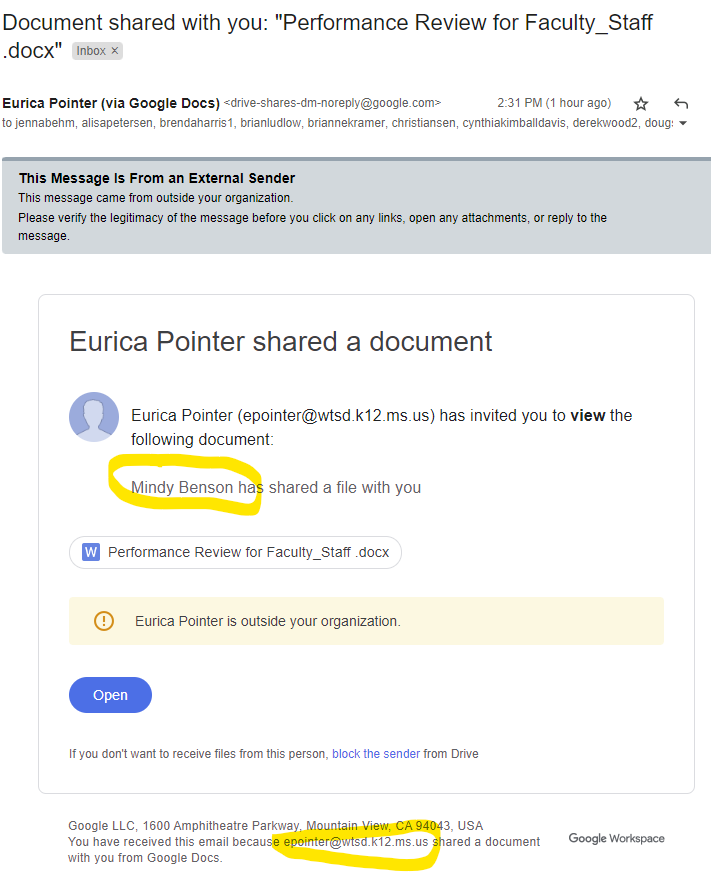
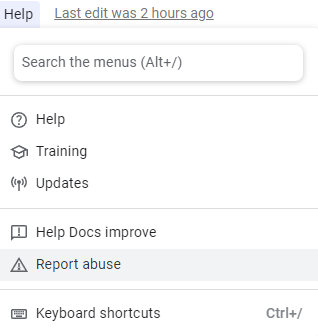
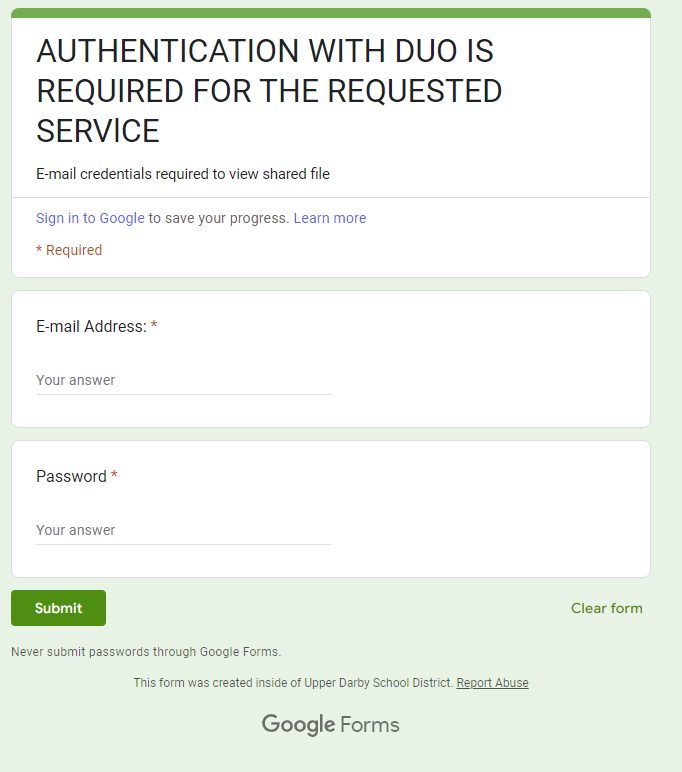
All, During the past few weeks, we have seen a significant uptick in phishing emails (we've had 3 of the below examples today). We anticipate these phishing emails will continue through the holiday season. To report any phishing or unwanted emails, please use our PhishAlarm tool ( https://my.suu.edu/help/article/3824/report-unwanted-and-malicious-emails/). As a backup/alternative, you may email phish@suu.edu. Attackers have gained access to email accounts from *outside of SUU* and use the document sharing features of Google Drive and Office 365 (OneDrive) to share documents with our @suu.edu email addresses. Typical emails you will receive look like the following (with highlights to identify the email may be an attack): [image: image.png] Some indicators to look for to determine if the shared document is legitimate or not are: - Is the shared document something I was expecting? - Is the document shared by someone in our organization or an organization I work with frequently? - Is there a comment leading me to believe someone at SUU is sharing a document with me (Mindy Benson example above)? If you open the shared document, most of these attacks open a document in Google Drive or Microsoft OneDrive. The Shared Document typically isn't malicious, but leads you to believe you need to authenticate somewhere else. An example can be found below. [image: Google Doc redirect to Google Form.png] If you open a Google Document similar to the one above, please open the Help menu and select "Report Abuse" (see image below). This will notify Google of an attack and they will eventually review the document to remove it for Phishing. [image: Help -> Report Abuse menu item] If you followed the link in the Shared document, we have typically seen a Google Form, or a copied website looking like our MySUU portal login page. The Google Form example is below. *Never submit passwords in a form.* [image: Google Form asking for email-password.png] You may also notice a "Report Abuse" link at the bottom of the form. Please report the abuse to Google as a phishing page if you already got this far in the phishing process. *If* you have submitted your password in a Google Form (especially in the past month), *please change your password immediately.* Feel free to reach out to our Help Desk (865-8200 or support@suu.edu) if you need help changing your password. Thanks, Jim -- [image: suu.edu] <https://www.suu.edu/125/> Jim Shakespear | Director of IT Security INFORMATION TECHNOLOGY, SOUTHERN UTAH UNIVERSITY ELC 513 | (435) 865-8202